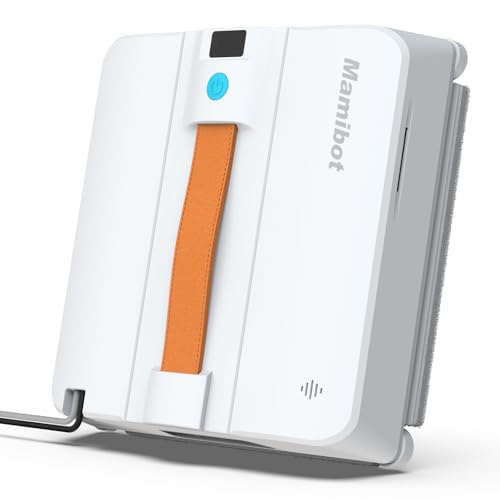
Mamibot W120-DP is the model with a product profile and three listing variants here. The manufacturer also publishes documentation under W120-DP PRO, W120-P, W120-T, W168 and W200 names. Those suffixes matter when finding instructions, comparing power systems and ordering parts; do not treat the wider W120 family as one robot.
Manufacturer sources checked September 15, 2026 provide a W120-DP product page and its own manual entry. W120-DP PRO has a separate manual entry, so DP specifications should not be carried over to PRO. Compare the three W120-DP offers on the same profile, checking the unit label, manual and included items. Before use, match the documented window limits, power supply, tether and retrieval procedure to your setup.
Mamibot model evidence map
This Site has one approved Mamibot model profile, not a complete Mamibot catalog. The evidence map prevents similar W120 names from being merged and shows why an unrepresented model is not a shopping recommendation.
| Model | Evidence available | What is supportable | Decision status | Do not infer |
|---|---|---|---|---|
| Mamibot W120-DP | Exact Mamibot product page, a separately named W120-DP manual entry, and three approved catalog variants consolidated on one profile. | Mamibot attributes dual-directional four-nozzle spray, app and remote control, power-interruption backup, and framed or frameless vertical-window use to W120-DP. | Investigate only after the offer label and downloadable manual both say W120-DP and the instructions approve the exact pane, angle, power, tether, and retrieval plan. | The product page excludes horizontal ceiling or roof glass. Its backup-battery claim is emergency support, not cordless cleaning runtime or fall-proof protection. |
| W120-DP PRO | Mamibot lists a separate W120-DP PRO manual in its support center. | The distinct manual name is enough to keep PRO separate from W120-DP during research. | Hold unless an approved offer, exact model label, and matching PRO manual become available together. | No W120-DP feature, ASIN, image, destination, or compatibility claim is transferred to W120-DP PRO. |
| W120-P / W120-T | Mamibot lists separate W120-P and W120-T manuals in its support center; W120-P also appears in the current window-cleaner family navigation. | These are separately named members of the broader W120 family, not spelling variants of W120-DP. | Research only. There is no approved commercial record for either model on this Site. | A shared W120 prefix does not prove shared spray, power, surface, size, control, safety, or accessory specifications. |
| W168 / W200 / W300 | Mamibot’s current window-cleaner navigation lists these model names; the support center separately lists W168 and W200 manuals. | The manufacturer recognizes additional window-cleaner models beyond the one approved catalog profile represented here. | Use Mamibot’s exact model page and manual if a future approved catalog record becomes available; until then, keep them non-commercial research gaps. | Family-menu presence does not establish present availability, a model hierarchy, or suitability for a visitor’s window. |
Exact-model document check
- Copy the full model string from the offer and the unit label, including DP, PRO, P, T, or another suffix.
- Match that string to the manual title in Mamibot’s support center; a nearby filename is not a match.
- Use the exact manual to verify glass orientation, pane dimensions, edge conditions, power, tether, fluid, pad, and retrieval instructions.
- Record the ASIN and included items separately. Matching model names do not prove matching bundles or sellers.
- If any identity or operating field is unresolved, hold the purchase or ask the manufacturer or seller for the exact document.
Source boundary: the exact W120-DP page supports only W120-DP claims. Mamibot’s family navigation and support index establish model names and document separation, not interchangeable specifications.
How to compare this family
- Match the full model and suffix across offer, unit label, ASIN, and manual
- Keep W120-DP, W120-DP PRO, W120-P, and W120-T evidence separate
- Verify pane, edge, angle, surface, and fluid rules in the exact manual
- Confirm power, emergency backup, tether, anchor, and retrieval instructions
- Compare current offer and included consumables only after the operating evidence matches
Questions readers ask
Why are three listings shown on one Mamibot W120-DP page?
All three listings use the W120-DP name, so their offers are grouped on one profile for comparison. A different ASIN may reflect a seller, bundle, or listing variant; it does not by itself prove a functional difference.
Is Mamibot W120-DP the same as W120-DP PRO?
Do not assume so. Mamibot lists separate W120-DP and W120-DP PRO manuals. Until an exact offer and model label connect to the PRO manual, W120-DP facts and commercial records stay with W120-DP only.
Does Mamibot W120-DP work on frameless windows?
Mamibot’s exact product page says W120-DP can work on framed and frameless vertical windows, but excludes horizontal ceiling or roof glass and gives an angle boundary. Treat that as a manufacturer claim, then use the exact manual and on-site conditions to decide whether a specific pane and setup are permitted.
Is the Mamibot W120-DP cordless?
No cordless-cleaning claim is made here. Mamibot describes a backup battery for emergency support during a power interruption; that is not the same as normal battery-powered cleaning and does not replace the specified power and safety setup.